
Open CTI stops working after 28 February 2028
Find out what the Open CTI retirement touches in your Salesforce org.
A free, read-only scan. Your Salesforce admin signs in, and about five minutes later you have a six-page report: how big the move is, how many seats, an indicative licence cost and when to start.
Run the free scanSee a sample PDF report
Free. Read-only: the scan changes nothing. No names, emails, phone numbers or record content read. Access ends the moment the scan does.
CX Labs has been a Salesforce partner since 2019 and connects telephony to Salesforce, Vonage included.
What you get
- ✓How many people are affected. Every call centre on Open CTI and the users assigned to it, so your licence count comes from your org, not an estimate.
- ✓What has to be rebuilt. Each piece of custom code that calls Open CTI, listed by name.
- ✓What else depends on it. The flows, triggers, reports and dashboards that use today's call fields and will need updating.
- ✓What it is likely to cost. An indicative Salesforce licence cost in your currency, and one migration impact rating for the whole org.
- ✓When to start. Whether the prerequisites are in place (Omni-Channel, Lightning Experience, licences) and a suggested start window based on the size of the job.
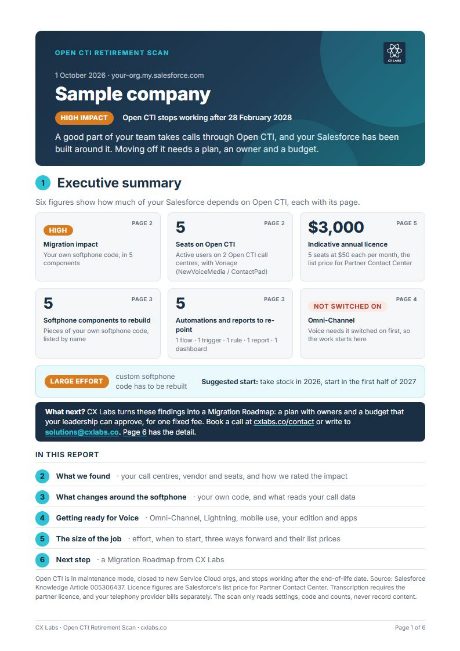 See a sample PDF report
What it reads, and what it never reads
The scan is read-only. It reads configuration, code and counts through the Salesforce APIs, with one token that is revoked the moment the scan ends. Your admin can also revoke it at any time from Setup, Connected Apps OAuth Usage.
Reads
- Call centre definitions and which users are assigned
- The source of your custom Apex, Lightning and Visualforce code and text static resources, to look for Open CTI calls; only component names and match counts are kept
- Installed packages, flows, triggers, rules, reports and dashboards that reference Open CTI or call fields
- Counts of call activity and logins, aggregated
- Omni-Channel, Lightning and Voice licence status
Never reads
- Task subjects or descriptions
- Names, email addresses, phone numbers or any other record content
- Managed package source code (hidden by Salesforce)
Access uses the Salesforce scope "Manage user data via APIs" only.
Want the background first? Open CTI retirement explained on cxlabs.co. Not the Salesforce admin? Send them this page.